
n8n vs Make vs Zapier: Real Costs and Who Each One Fits (2026)
n8n vs Make vs Zapier in 2026: tasks vs credits vs executions, what the same workflow really costs, free tiers compared, and who each tool fits, from someone who self-hosts n8n.
The short answer
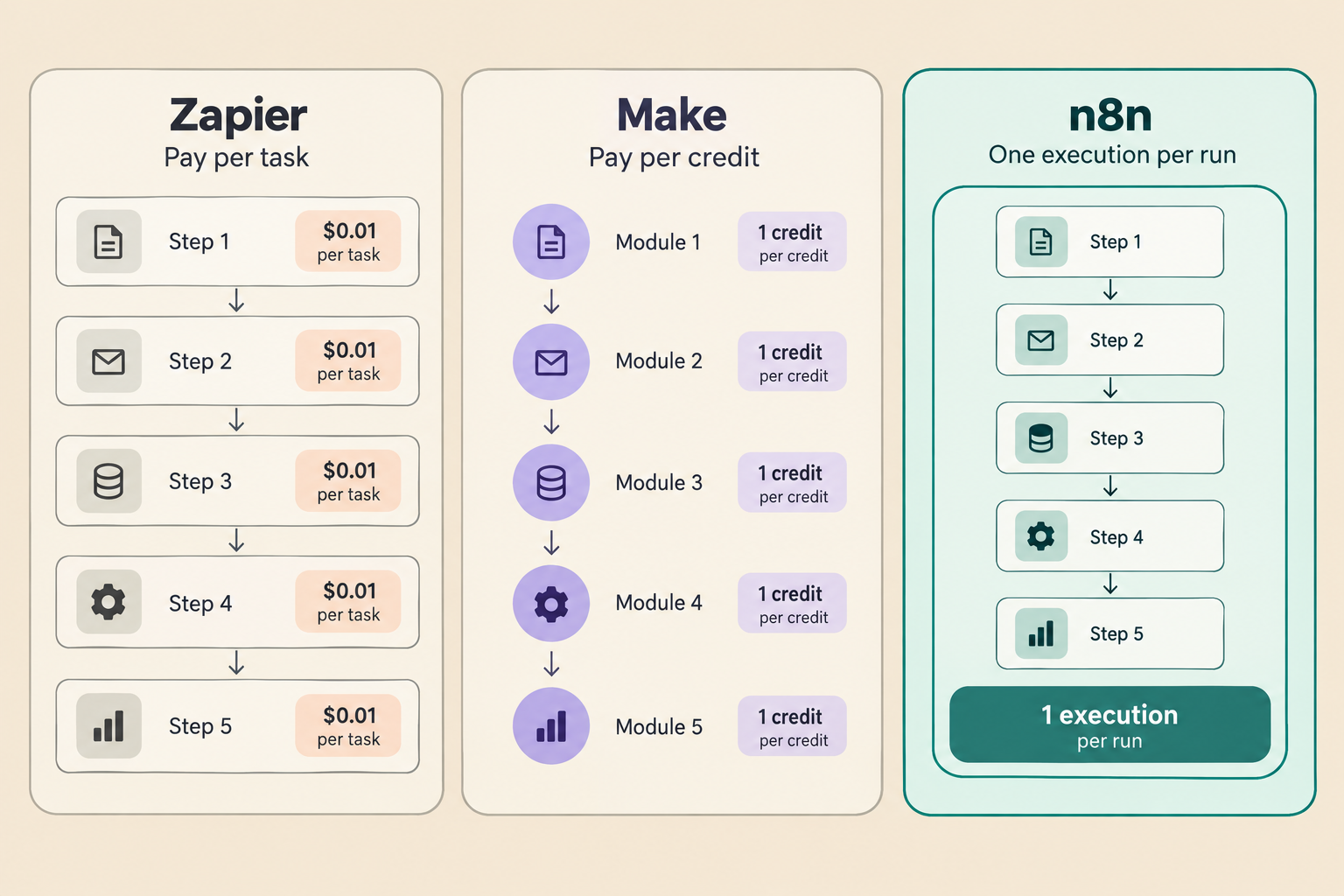
All three tools connect your apps and run workflows for you. The real difference is how they count your work, and that decides your bill more than any feature list. Zapier charges per task, which is every step. Make charges per credit, roughly every module. n8n charges per execution, one whole run no matter how many steps it has, and if you self-host it, the software itself is free.
I run my own business on self-hosted n8n, so read this with that bias in mind. I picked it because my workflows are long and I like owning my data. If your situation is different, one of the other two is genuinely the better buy, and I will say so where that is true.
The meter is the whole game
Comparing landing-page prices across these three is useless until you know what each one counts:
- Zapier bills tasks. A task is each successful action step in a Zap. Triggers and filters are free, but a five-step workflow uses five tasks per run.
- Make bills credits. Most modules that read or write data use one credit, including the trigger. The nice exception: routers and branching logic cost nothing.
- n8n bills executions. One execution is a full workflow run, start to finish. A two-step ping and a fifty-step monster cost the same one execution.
So the same five-step workflow, run 1,000 times in a month, consumes 5,000 Zapier tasks, about 5,000 Make credits, or 1,000 n8n executions. Every pricing comparison you will read, including this one, is really that arithmetic wearing a trench coat.
What the plans cost right now
Prices as of November 2026, billed annually, from the vendors' own pages and cross-checked against two independent comparisons published this month:
- Zapier. Free: 100 tasks a month, two-step Zaps only, so no real multi-step automation. Professional from $19.99/month for 750 tasks; the same plan with 5,000 tasks is $89. Team from $69/month with 2,000 tasks and 25 seats. Professional is a single seat.
- Make. Free: 1,000 credits a month but only two active scenarios. Core from $9/month for 10,000 credits. Pro $16, Teams $29, both with the same 10,000 credits and more features. Unlimited users on every plan.
- n8n. Community Edition: free, self-hosted, unlimited executions, you pay only for the server. Cloud Starter 20€/month for 2,500 executions, Pro 50€ for 10,000. Unlimited users on every plan.
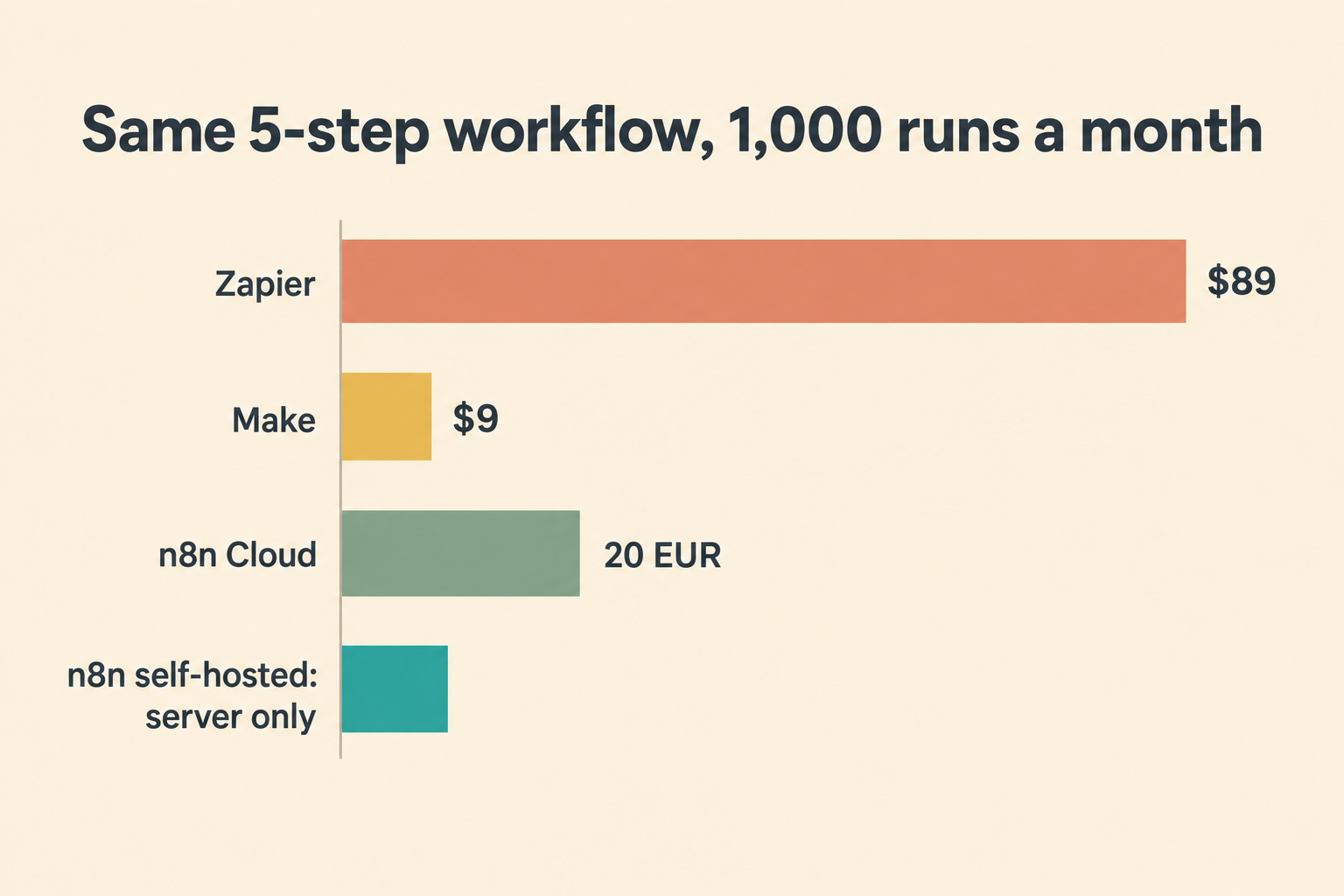
Run our five-step example at 1,000 monthly runs and the bill lands near $89 on Zapier, $9 on Make, 20€ on n8n Cloud, or the cost of your server alone on self-hosted n8n. That spread is not a discount war. It is three different meters measuring the same work.
What happens at the limit matters too. Zapier keeps running and switches to pay-per-task billing, convenient and easy to miss on the invoice. Make stops your scenarios until you add credits. n8n Cloud caps the overage. Self-hosted n8n has no limit to hit in the first place.
Beyond the bill
Money is not the only axis, and pretending it is would make this a worse article:
- App coverage. Zapier connects over 9,000 apps, the largest library by far, and its builder is the friendliest for non-technical people. Make covers the mainstream tools well. n8n's library is smaller but growing, and anything with an API works through its HTTP node.
- AI features. All three now ship AI steps and agent building blocks. On Zapier, some AI products bill separately. Make bundles AI modules into every plan. n8n's AI agent nodes work with your own API keys, and an agent loop that calls a model ten times still counts as one execution.
- Data ownership. Only n8n can run on your own server, which means your customer data and API credentials never leave a machine you control. For European clients and GDPR conversations, that ends arguments.
- Who can use it. Make and n8n include unlimited users on every plan. Zapier charges real money for collaboration: sharing starts at Team.
Which one should you pick
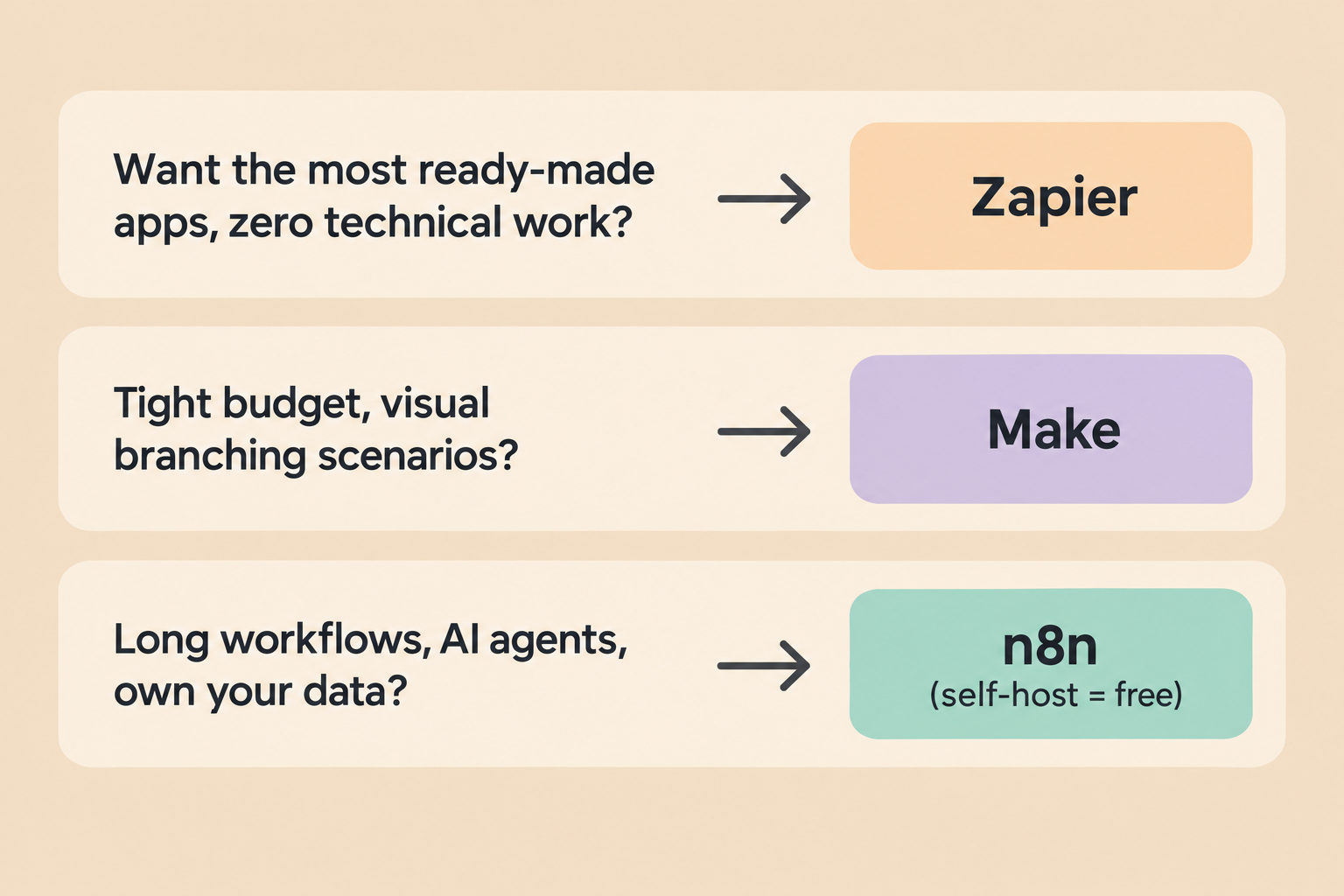
Pick Zapier if nobody on the team wants to touch anything technical, you need an obscure app that only Zapier connects, your workflows are short, and the per-task premium is worth the hand-holding. It is the easiest start and the most expensive growth curve.
Pick Make if budget matters, your scenarios are visual with lots of branching, and you are fine with someone else running the infrastructure. Core at $9 with 10,000 credits is the best value in hosted automation right now.
Pick n8n if your workflows are long or agent-heavy, you want unlimited runs without watching a meter, or your data has to stay on your own hardware. Self-hosting makes it free forever; my guide to what free n8n actually costs breaks down the honest bill, including the server and the maintenance time nobody mentions.
What I run, and why
My own setup is n8n self-hosted on a small VPS. The workflows I care about are exactly the kind per-step billing punishes: my email triage agent classifies, labels, and drafts in one long run; my error logging pipeline fans out across several steps; my Airtable sync loops over records. On Zapier those would burn tasks by the handful. On my server they cost me nothing per run, and I watch the whole thing with the backup workflow keeping me honest.
That is the practitioner view the comparison tables miss: the meter you can ignore changes how you build. I add steps freely, retry aggressively, and never once opened a billing page in anger.
Questions people ask
Is n8n better than Zapier?
For long or complex workflows and for anyone who wants to self-host, yes: the per-execution meter and free Community Edition win on cost and control. For non-technical teams that need the largest app library and the gentlest builder, Zapier is still the easier product.
Is Make cheaper than Zapier?
At list prices, clearly. Make's Core plan gives you 10,000 credits for $9 a month billed annually, while Zapier's entry plan gives 750 tasks for $19.99, and each tool's unit covers roughly one step of work.
Can you self-host Make or Zapier?
No. Both are hosted-only services. n8n is the only one of the three with a self-hosted edition, and that edition is free under its Sustainable Use License.
What is the difference between a task, a credit and an execution?
A task is one successful step in Zapier, a credit is roughly one module action in Make, and an execution is one complete workflow run in n8n, regardless of step count. Five-step workflow, 1,000 runs: 5,000 tasks, about 5,000 credits, 1,000 executions.
Which is best for beginners?
Zapier for the gentlest learning curve, Make for the cheapest real usage, n8n if you are comfortable with light technical work or want to grow into AI agents. All three have free tiers or trials, so test with a real workflow before paying anything.
Bottom line
Count your steps before you compare prices. Short and simple, on a generous app library: Zapier, and pay for the convenience. Visual and budget-tight: Make, the best value in hosted automation. Long, agent-heavy, or yours to own: n8n, self-hosted if you can, Cloud if you cannot. None of the three is lying about its price. They are just counting different things, and now you know which thing each one counts.
Pricing note: prices checked November 2026 against vendor pages and two independent comparisons from the same month. Zapier and n8n figures confirmed on their own pricing pages; Make's entry price is corroborated by two independent sources because its page renders prices dynamically. All three change pricing regularly, so verify before you buy.
Related articles in Technology
Is n8n Free? Pricing and Self-Hosting Explained (2026)
Is n8n free? Yes, self-hosted. What the Community Edition includes, what n8n Cloud costs in 2026, the license catch, and the real monthly bill, from someone running it.

Build an Email Triage Agent with n8n (2026 Guide)
A step-by-step build of the n8n agent that sorts my inbox: Gmail trigger, LLM classification, labels, reply drafts, and one morning digest. Prompts, settings, costs and mistakes included.

Automate n8n Backups to Dropbox (2026)
Mastering Your Digital Fortune: The Power of n8n workflow backup automation 2026 In the volatile worlds of crypto markets and stock investing, where fortunes can shift in an instant, proactive risk management isn’t just a good idea – it’s your digital lifeline. As we hurtle towards 2026, the reliance on sophisticated automation tools like n8n
Get new Blogtechi articles by email.
Get the latest insights on AI, automation, and future tech delivered to your inbox. You confirm your address first and can unsubscribe at any time.
By subscribing, you agree to our Privacy Policy and Terms of Service.